
 Monitoring
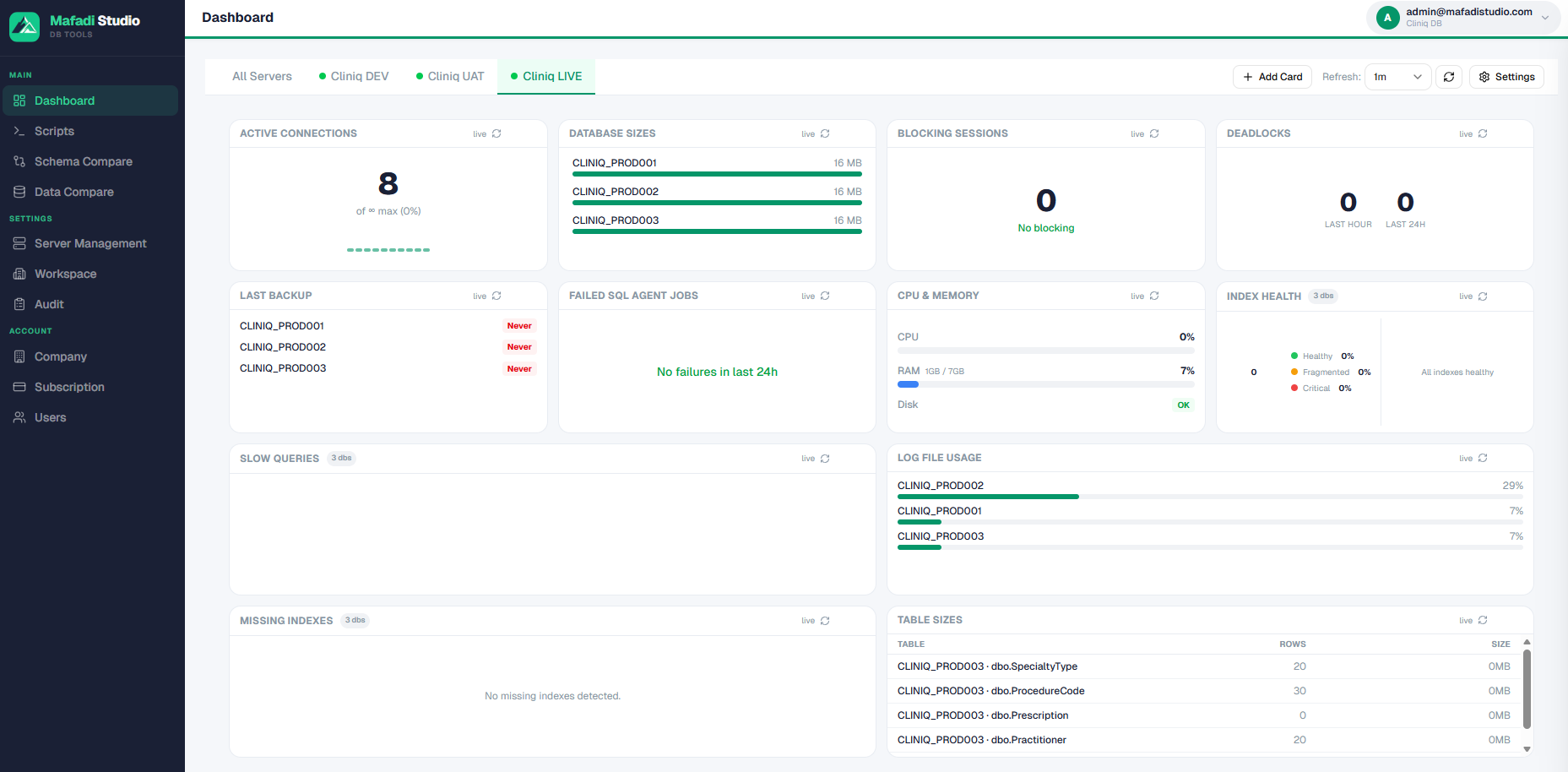
Live health dashboards
Stop checking servers one by one. Backups, connections, log usage, and slow queries stream into one live view — so you spot trouble the moment it starts, not when a user reports it.
Live monitoring, AI diagnostics, schema and data compare, and multi-server scripting — fully integrated in one platform. No more juggling five different tools.
SQL Server monitoring, performance diagnostics, and administration without juggling five different tools.
Monitoring
Stop checking servers one by one. Backups, connections, log usage, and slow queries stream into one live view — so you spot trouble the moment it starts, not when a user reports it.
 AI assistance
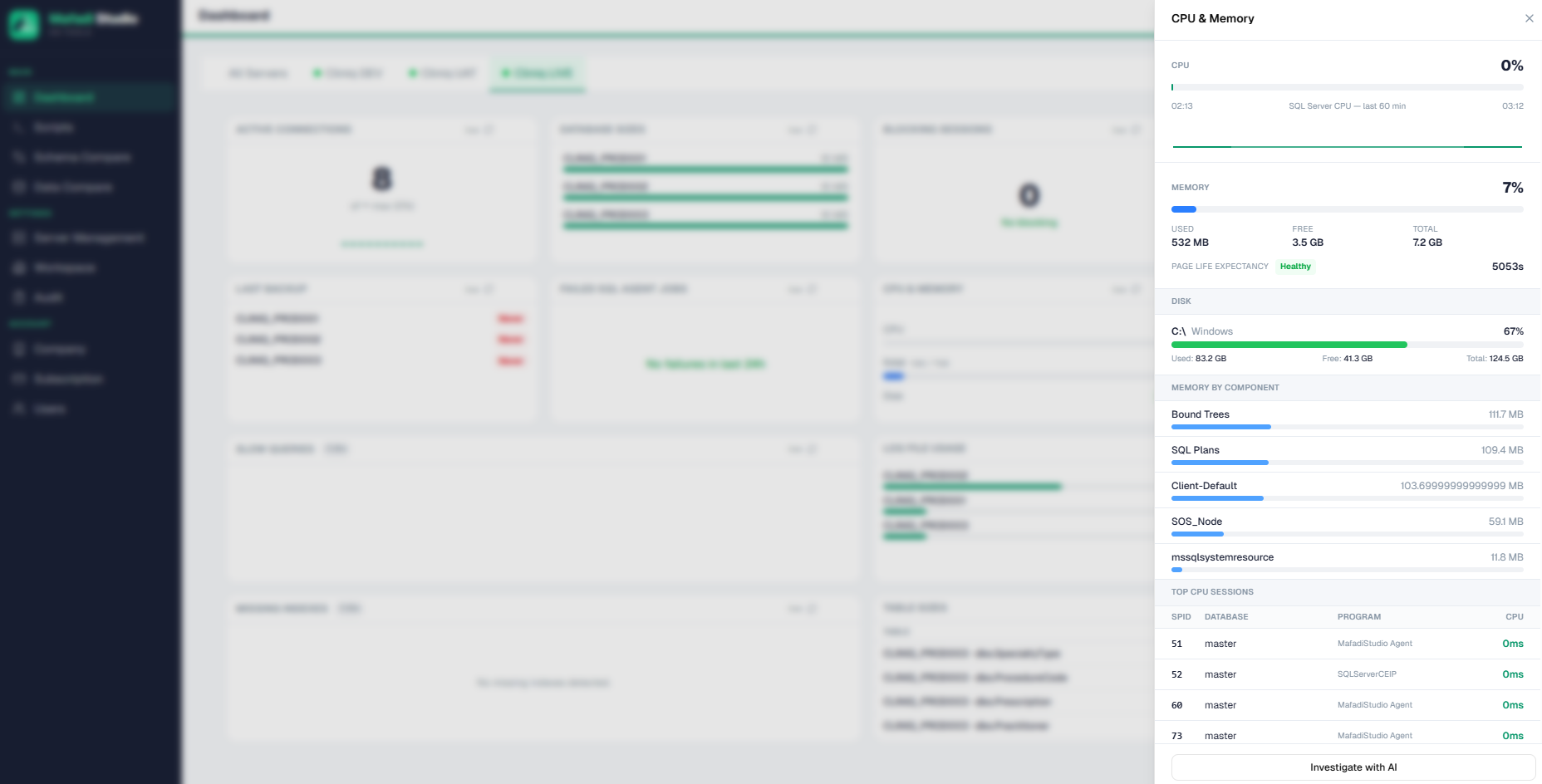
Not just generic advice — real analysis of your specific server. Paste any slow query, error message, or health alert, click Investigate with AI, and get a plain-English explanation plus a concrete fix in seconds. Like having a senior DBA on call, 24/7.
 Database health
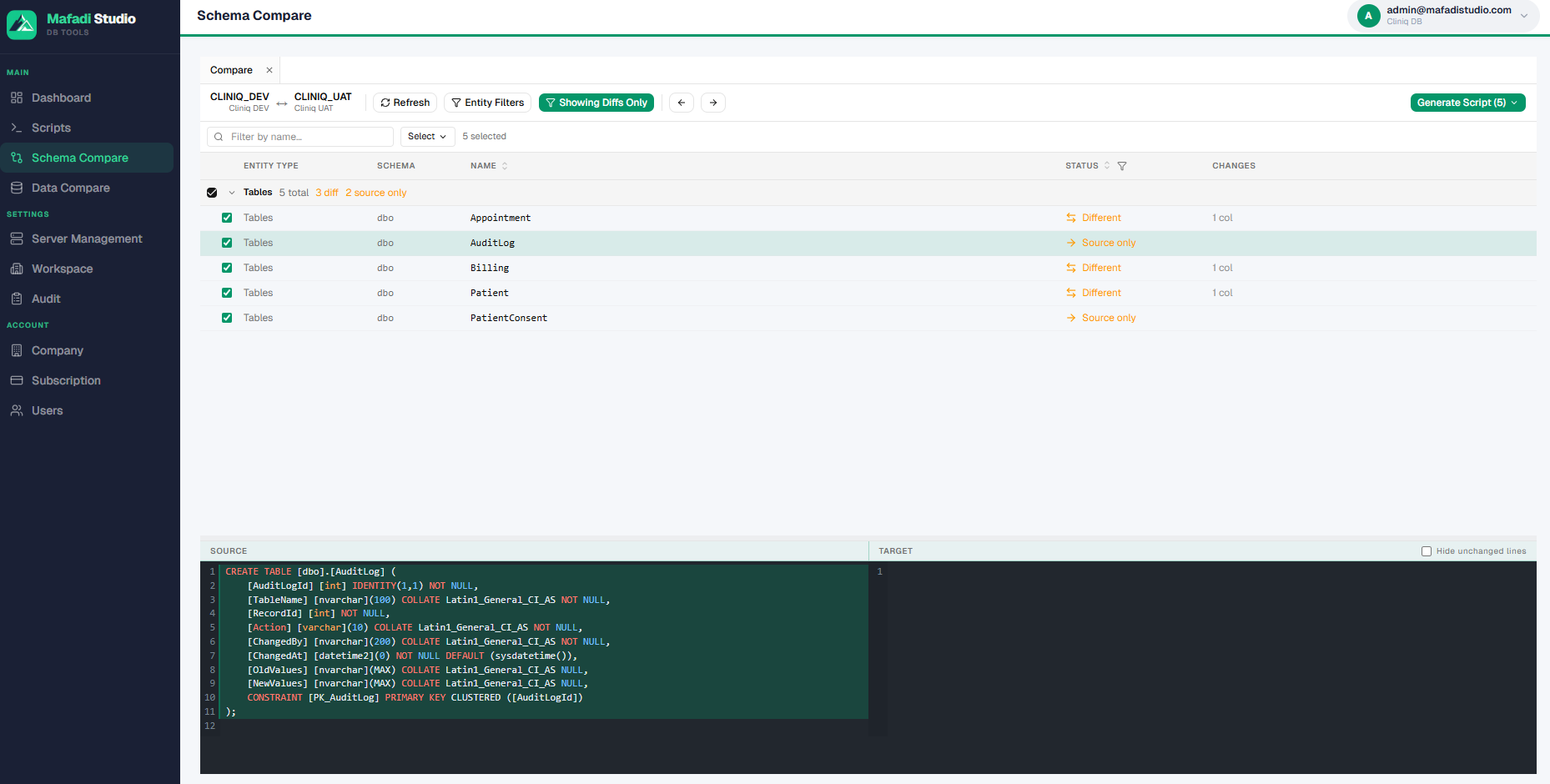
Schema drift breaks deployments. Compare any two servers side by side and generate dependency-aware sync scripts, so dev, test, and production stay in step.
 Database health
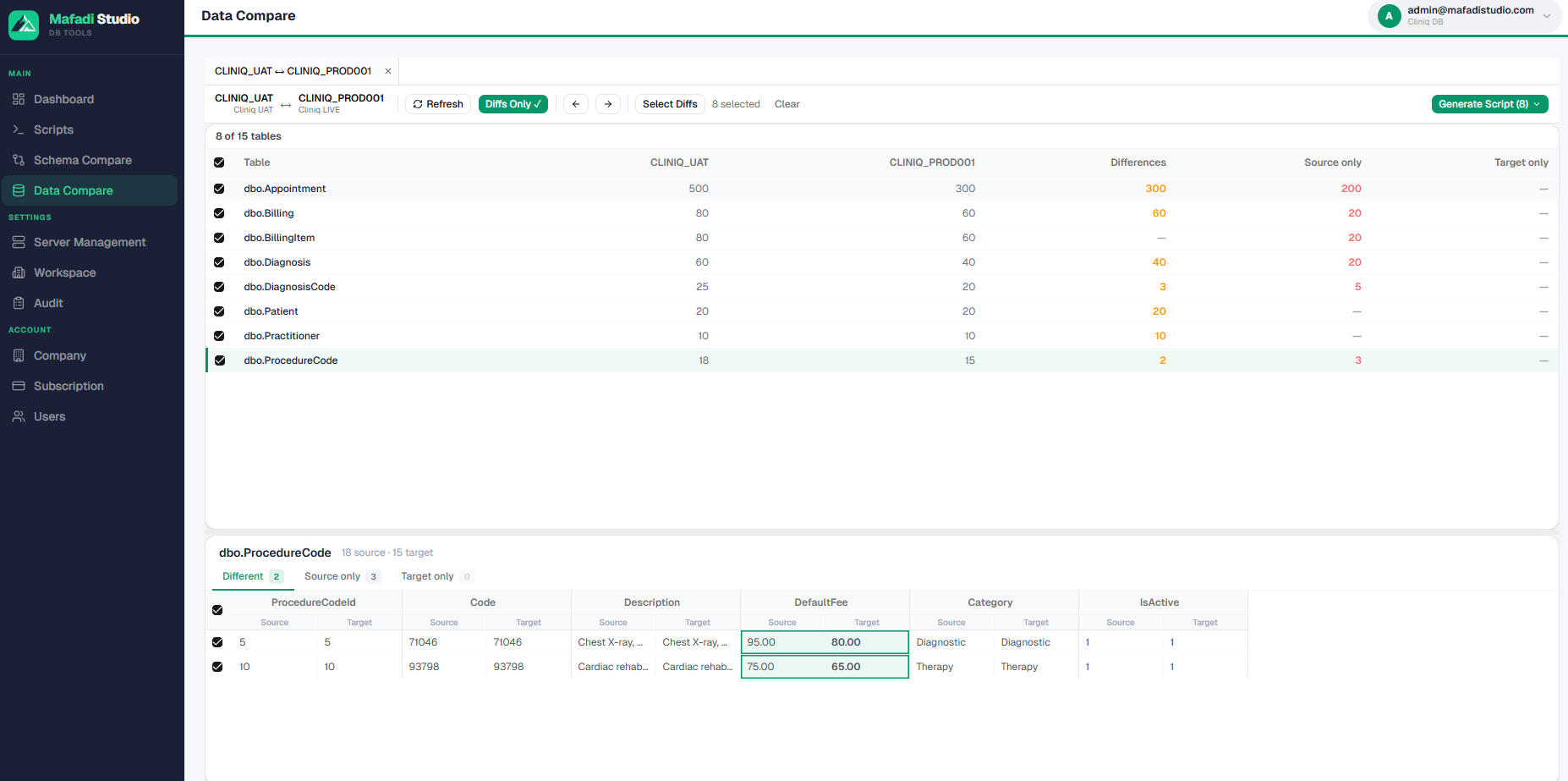
Find row-level differences between environments and generate the exact script to reconcile them — no more manual side-by-side SELECT sessions.
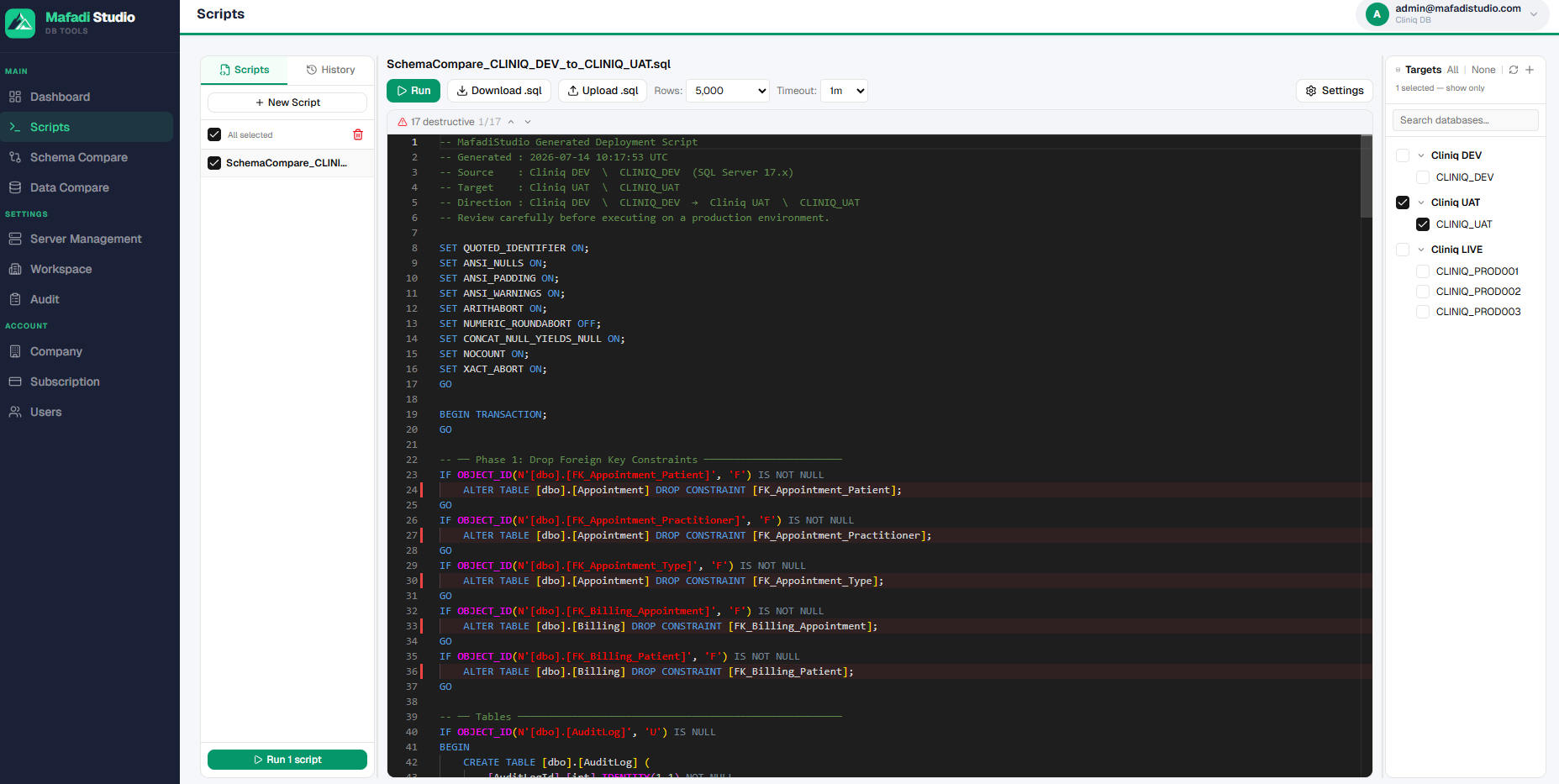 Administration
Run one script across all your servers and hundreds of databases in a single click, with results collected in one place — instead of hopping between SSMS windows.
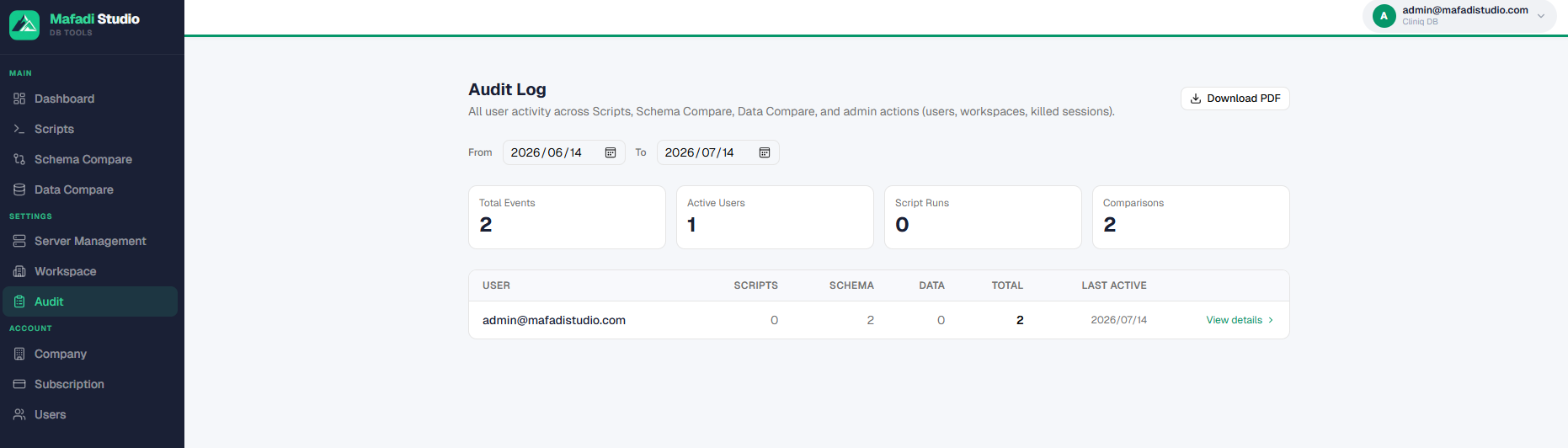 Security
Prove who ran what, where, and when. Every action is logged and reportable, with role-based access that keeps teams and client environments cleanly separated.
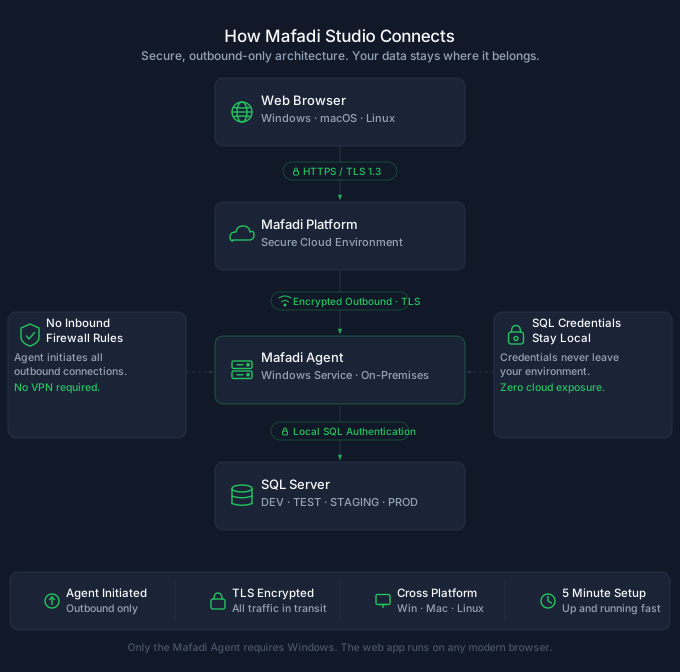
No VPNs, no firewall changes. A lightweight agent connects your SQL Servers securely to your dashboard.
Sign up, name your workspace, and invite your team with role-based access from day one.
A tiny Windows service connects outbound over TLS — your SQL Servers never need to be exposed to the internet.
The agent dials out over HTTPS — your SQL credentials stay on your machine, encrypted. No inbound ports, no VPN, no firewall changes.
Dashboards light up in real time. AI-assisted diagnostics flag what matters, and compare tools help you ship the fix fast.
Connecting a monitoring tool to your SQL Server is a decision you should make with full information. Here's exactly how Mafadi Studio works.
Your SQL Server credentials are entered locally during agent setup and encrypted using Windows DPAPI machine-scoped encryption. Mafadi Studio never sees, stores, or transmits them — not even in encrypted form. They are unreadable even if a disk or backup is stolen.
The MafadiStudio Agent connects outbound to Mafadi Studio over HTTPS on port 443 — exactly like any web browser. No inbound firewall rules, no VPN, no network reconfiguration required. It works through corporate proxies and NAT.
Setup provides a Prepare Database script that creates a dedicated SQL login for monitoring. You review exactly what permissions it receives before running it. You can configure a read-only login for monitoring and an optional separate login for script execution — you decide what each can do.
Script execution commands are individually signed with your agent token, and the agent rejects unsigned or tampered payloads before it runs anything. Every other instruction travels over the same authenticated, TLS-encrypted connection the agent opens outbound. A lost or stolen machine can be locked out instantly by rotating the token from your dashboard.
Operational metrics (CPU, connections, backup status) are stored on our servers — that is the monitoring product. Schema and data compare results pass through memory only and are not persisted. Script execution history is stored so you can audit it. What we store, we document.
AI Insights sends only server health metrics — never your table data or credentials — to Anthropic's API, and only when you explicitly request an analysis. Nothing is sent automatically in the background. AI features can be left entirely unused without affecting any other part of the platform.
Questions about security or compliance? hello@mafadistudio.com
Most teams managing SQL Server are stitching together separate monitoring, comparison, and scripting tools — each with its own licence, login, and learning curve.
| Mafadi Studio | The old way | |
|---|---|---|
| Live monitoring dashboard | ✓ Included | Requires separate monitoring tool |
| AI-assisted diagnostics | ✓ Optional add-on | Not available |
| Schema compare | ✓ Included | Separate licence required |
| Data compare | ✓ Included | Separate licence required |
| Multi-server script execution | ✓ Included | Manual SSMS windows |
| Audit & access control | ✓ Included | Limited or separate tool |
| Works on Mac | ✓ Any browser | ✗ Windows-only desktop apps |
| Price | $49 / seat / month | $100–$600+ / user / year per tool |
| Servers included | Unlimited | Often per-server pricing |
| Free trial | ✓ 14 days, no card required | Varies |
Start free. Upgrade when you're ready. Every paid seat gets the full platform and unlimited servers — AI features are an optional add-on.
Get started, no commitment.
No credit card. Never expires.
Create free accountFull platform, unlimited servers.
Billed monthly · excl. VAT
Start free trial14-day trial · No credit card
For large SQL Server estates.
Volume pricing, onboarding help, and priority support.
Talk to usWant the AI features? AI Insights, AI script preflight, and AI error explanations come as one optional add-on at $19 / month on top of a paid subscription — add it or drop it at any time. Contact us for details.
Mafadi Studio was built out of frustration — the frustration of managing SQL Server environments with a different tool for every task. Every feature exists because someone needed it in production.
Built by a team with two decades of SQL Server production experience.
15 live metrics on day one. More on the way.
New product. No customer reviews yet — that's exactly why the trial needs no credit card. Judge it yourself.
A lightweight Windows service — the MafadiStudio Agent — installs on any Windows machine that can reach your SQL Server over the network. It can be the SQL Server machine itself, though we recommend a separate always-on machine (a utility server or VM) so monitoring stays independent of the server being monitored. The agent dials out to Mafadi Studio over HTTPS on port 443. That is the only network path — no inbound firewall rules, no VPN, no network changes required.
Never. Credentials are entered locally during agent setup and encrypted using Windows DPAPI machine-scoped encryption. They are stored on your machine only — unreadable even if a disk or backup is stolen. Mafadi Studio never sees, stores, or transmits them.
Operational metrics — CPU, memory, connections, database sizes, backup status, blocking — are sent to and stored on Mafadi's servers. That is the monitoring product. Schema and data compare results pass through Mafadi's servers in memory only and are not persisted. Script execution history, including result sets, is stored so you can review and audit it later. Your SQL credentials never leave your machine under any circumstances.
Setup provides a "Prepare Database" script that creates a dedicated SQL login for monitoring. You can review exactly what permissions it receives before running it. For tighter control, you can configure a read-only login for monitoring and a separate login for script execution — so the monitoring login can never write anything, regardless of what the platform sends.
No. We do not have access to your database data. Your credentials never reach our servers. Metrics are aggregated health data about your server, not the contents of your tables. Schema compare results pass through memory and are not stored. The exception to be aware of: if you use the Script Executor and run a query that returns rows, those result sets are stored in your execution history. Treat the Script Executor accordingly if you are working with sensitive data.
Rotate or revoke the agent token from your dashboard at any time — this instantly disconnects that agent. To stop all data collection permanently, uninstall the agent from the Windows machine. No data is collected unless the agent is running and connected.
Yes — every new account gets 14 days on the Standard plan with no credit card required: unlimited servers and databases, the full monitoring dashboard, schema and data compare, script execution, and team collaboration. The AI features are not part of the trial — AI Insights, AI script preflight, and AI error explanations come as a separate $19 / month add-on that needs a paid subscription. At the end of the trial your account automatically moves to the free tier unless you choose to upgrade.
The free plan includes 1 user, 1 workspace, up to 2 servers and 5 databases, a basic monitoring dashboard, schema compare, and data compare. It never expires. The Script Executor, the full monitoring dashboard, and team collaboration are Standard plan features. Every AI feature — AI Insights, AI script preflight, and AI error explanations — is a separate $19 / month add-on for paid subscriptions.
Yes. The platform runs in any modern browser — Safari, Chrome, Edge, Firefox — on Mac, Windows, iPad, or any device with a browser. The MafadiStudio Agent is a Windows service that runs on the machine monitoring your SQL Server. You manage and monitor everything from your browser, on whatever device you prefer.
Most teams go from sign-up to a live dashboard in under 5 minutes. Sign up, click Add Server and name your server, run the provided Prepare Database script on your SQL Server (creates the monitoring login), download the agent — a single .exe, no installer required — and run a couple of commands to register it as a Windows service. Within 60 seconds your server shows online and metrics start flowing.
No. The agent connects outbound over HTTPS on port 443. No inbound firewall rules, no VPN, no network configuration changes required. It works through corporate proxies and NAT.
Those tools are sold as separate products — each with its own licence, its own login, and its own interface. Mafadi Studio integrates live monitoring, AI diagnostics, schema compare, data compare, multi-server scripting, and audit logging in one platform, at $49/seat/month with no server limits, accessible from any browser including Mac.
No. The Standard plan includes unlimited servers and databases. You pay per seat — per user — not per server.
SQL Server 2016 SP1 and later, on any edition including Express. This covers on-premises installations, VMs, and Azure SQL Managed Instance. Azure SQL Database (the PaaS single-database service) is not currently supported. If you are unsure whether your environment is supported, contact us at hello@mafadistudio.com.
AI features are powered by Claude (Anthropic). When you use an AI feature, only the context needed for that specific analysis is sent — and only when you explicitly request it. Nothing is sent automatically. For health insights, only server performance metrics and your server's display name are sent — never your table data, credentials, or business data. For script error analysis, the SQL text of the failed script and the error message are sent. Data processed by Anthropic's API is covered by their commercial terms, which do not permit training on customer API data. If your compliance policy prohibits third-party AI processing, AI features can be left entirely unused — the rest of the platform does not depend on them.
Cancel any time from your account settings. Access continues until the end of your billing period. To fully disconnect all monitoring, uninstall the agent from your Windows machine — this stops all data collection immediately. Your agent token can also be rotated or revoked from the dashboard at any time.
Questions about pricing, deployment, or whether Mafadi Studio fits your SQL Server environment? Email us — we reply within one business day.